---
title: "DictationDaily: turning real videos into sentence-by-sentence listening practice"
description: "A close look at DictationDaily: a listen–type–fix loop over real YouTube videos, a Next.js/React/MUI stack on Cloudflare, in-browser grading and Whisper-powered Shadowing. Why an old idea feels this polished."
url: https://around-ai.com/dictationdaily-review
author: thucpham (AI Engineer)
language: en
published: 2026-10-29
updated: 2026-10-28
tags: ["edtech", "review", "next.js", "cloudflare", "workers-ai", "whisper", "ux", "language-learning"]
---
# DictationDaily: turning real videos into sentence-by-sentence listening practice
# DictationDaily: turning real videos into sentence-by-sentence listening practice
> **TL;DR:** [DictationDaily](https://dictationdaily.com/) didn't invent dictation — listening and writing down what you hear is older than the internet. What it does very well is **remove friction** at every step: find a video at your level among 1,800+ real English YouTube videos, hear one sentence, type it, get told about *exactly one mistake* per attempt, and come back tomorrow thanks to a streak. Underneath is a lean, sensible stack: **Next.js + React + MUI** on the client, **YouTube** for playback, **Cloudflare** at the edge, answers **graded right in the browser**, and **Whisper on Cloudflare Workers AI** for the Shadowing mode. A small product with taste, worth a close look for builders and English learners alike.
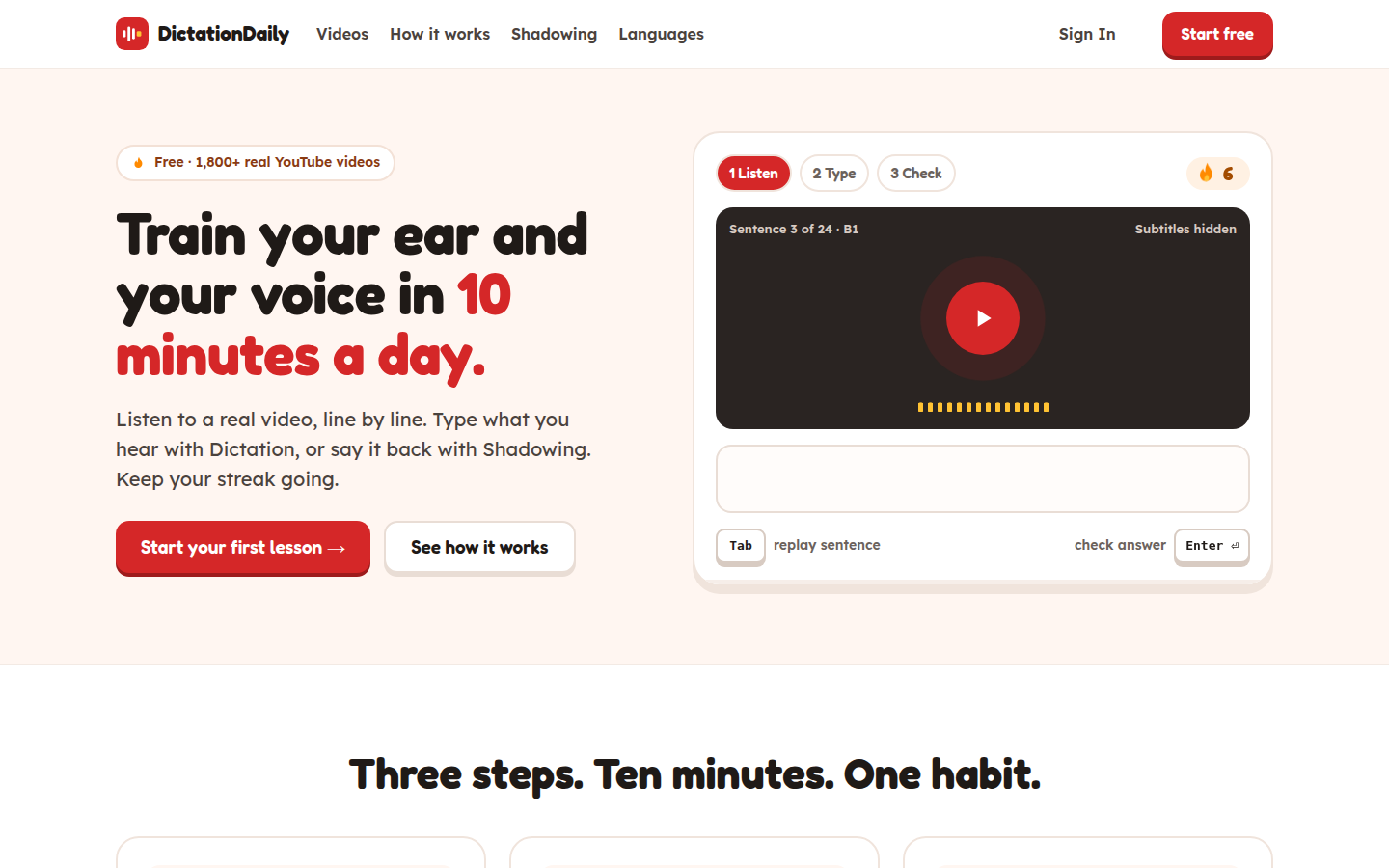
*The home page states the promise on the first screen: 10 minutes a day, three steps — Listen → Type → Check — and a streak. Captured 28 Oct 2026.*
## At a glance
| Item | What we observed |
|---|---|
| Product | Dictation (listen and type) and shadowing (repeat aloud) on real videos |
| Content | English **1,837 videos**; French (80), German (74), Italian (73), Spanish (76) already live; Portuguese "soon" — figures published on the home page |
| Levels | Filters for B1–C2, length, speaking speed, topic |
| Frontend | Next.js (Turbopack), React, Material UI |
| Infrastructure | Cloudflare at the edge, HTML served from cache (`cf-cache-status: HIT`) |
| AI | Whisper via Cloudflare Workers AI for Shadowing (Pro) |
| Accounts | Google sign-in to sync progress; lessons work without signing in |
The interesting part isn't the idea, it's the packaging. All of the product's value sits in one loop — **find a fitting video → listen → type → get feedback → come back tomorrow** — and every link in that loop has been sanded down.
```mermaid
flowchart LR
A["🔎 Find a video
level · speed · length"] --> B["🎧 Hear one sentence
plays 3 times, then stops"]
B --> C["⌨️ Type the middle
first & last words given"]
C --> D{"Enter: check"}
D -- "wrong" --> E["Flag EXACTLY ONE mistake
wrong · missing · extra · near-miss"]
E --> B
D -- "right" --> F["Space: next sentence"]
F --> B
F --> G["🔥 Streak + daily minutes
come back tomorrow"]
G --> A
```
## The learning experience: every detail has a reason
### Pick videos by how hard they are to hear, not just by topic
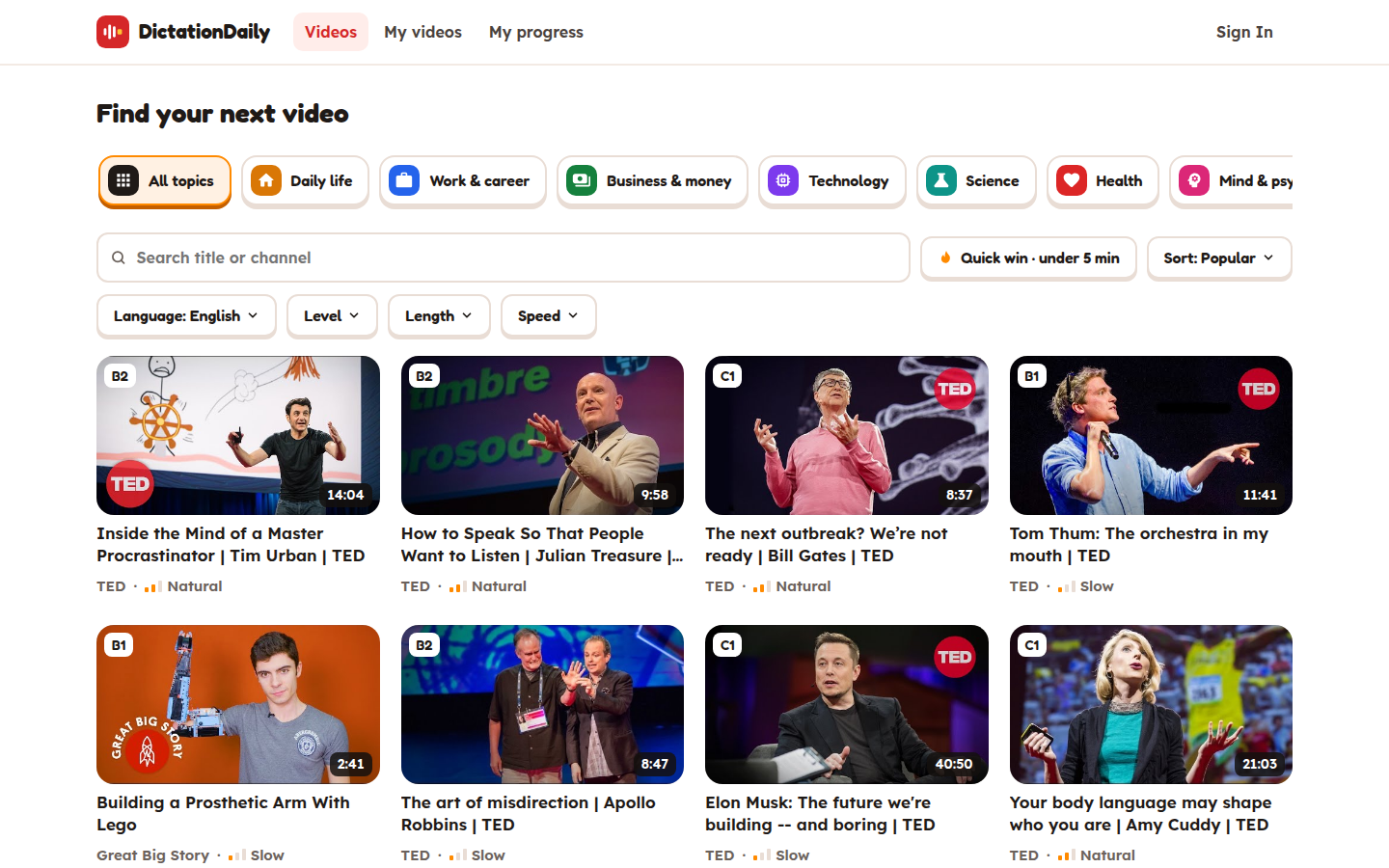
*The video library: each card shows a level badge (B1/B2/C1), duration and a speaking-speed label (Slow/Natural).*
Learners open the [video library](https://dictationdaily.com/videos), search by title or channel, filter by level B1–C2, length and speaking speed, or hit **"Quick win"** for a video under five minutes. The **"Slowest speaker first"** sort shows real empathy for learners: in listening practice, how fast someone actually talks usually decides whether a video is doable far more than a generic "easy/hard" tag. The speed label sits right on each card, so you don't have to open videos one by one to find out. One caveat: **not every video has a level tag yet**. [Source: finding a video](https://docs.dictationdaily.com/find-a-video.html)
### "Just enough" feedback: one mistake at a time
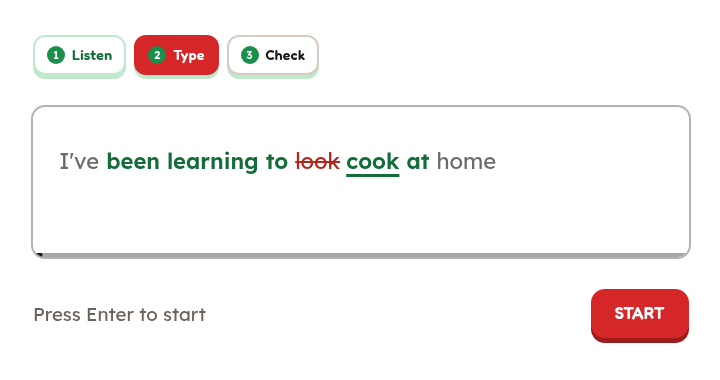
*One-mistake feedback: correct words turn green, the wrong word is struck through and replaced; you fix it and listen again.*
In a lesson, the first and last words of the sentence are given and you type the middle; capitalization and most punctuation don't count against you. When you're wrong, the app flags **one mistake per attempt** — a wrong word, a missing word, an extra word or a near-miss spelling — and lets you listen again and fix it, instead of revealing the whole answer. It's a subtle teaching choice: it pushes you back to the audio, which is exactly the point of detailed listening practice. [Source: your first lesson](https://docs.dictationdaily.com/quick-start.html) · [how hints work](https://docs.dictationdaily.com/hints.html)
You can picture the grading as a token-by-token match loop (a model of the documented behavior, not the site's actual source code):
```mermaid
stateDiagram-v2
state "Hear sentence" as Listen
state "Type the middle" as Type
state "Normalize" as Normalize
state "Match word by word" as Match
state "Flag 1 mistake" as Flag
state "Correct" as Correct
state "Skip" as Skip
[*] --> Listen: plays 3 times
Listen --> Type
Type --> Normalize: Enter
Normalize --> Match: drop case, punctuation
Match --> Flag: first mismatch
Flag --> Listen: Tab replays
Match --> Correct: full match
Correct --> [*]: Space for next
Listen --> Skip: Esc
Skip --> [*]
```
### Keyboard-first, hands never leave the keys
Per the guide, each sentence plays three times and then stops; `Tab` replays, `Enter` checks, `Space` moves on and `Esc` skips. The player can slow the video to 0.5× or 0.75×. That tiny set of shortcuts turns a lesson into an almost uninterrupted rhythm on a laptop — the same "keyboard-first" feel many developer tools aim for. [Source: keyboard shortcuts](https://docs.dictationdaily.com/keyboard-shortcuts.html) · [when a sentence is too hard](https://docs.dictationdaily.com/too-hard.html)
### Hidden subtitles, a "Just listen" section, and a forgiving streak
Subtitles are hidden during the exercise so listening doesn't turn into reading. Music and unclear speech go into a **"Just listen"** section instead of making you transcribe a line even the machine transcript isn't sure about. After Google sign-in, per-video progress, active study time, a daily goal (5/10/15/20 minutes) and your streak sync across devices. The humane bit: **one correct sentence is enough to keep the streak**, you don't have to hit your minutes. You can do lessons without signing in; progress just isn't saved. [Source: FAQ](https://docs.dictationdaily.com/faq.html) · [saving progress](https://docs.dictationdaily.com/save-progress.html) · [streaks](https://docs.dictationdaily.com/streaks.html)
## The tech underneath: lean and in the right places
A look at the public HTML/JavaScript, part of the shipped bundle and the HTTP headers points to a very level-headed architecture:
```mermaid
flowchart TB
subgraph Browser["🖥️ Learner's browser"]
UI["Next.js + React + MUI
(Turbopack chunks)"]
Grader["Client-side dictation grading
typed answers stay in the browser"]
YT["YouTube iframe player"]
UI --- Grader
UI --- YT
end
subgraph CF["☁️ Cloudflare"]
Edge["Edge cache
HTML/assets"]
Acc["Account data
progress · streaks"]
AI["Workers AI
Whisper (Shadowing)"]
end
YTS[("YouTube")]
Google["Google Sign-In"]
UI -- "page load" --> Edge
YT -- "video stream" --> YTS
UI -- "progress (signed in)" --> Acc
UI -- "sign-in" --> Google
UI -- "audio recording (Shadowing only)" --> AI
```
- **Frontend:** the HTML pulls `/_next/static/chunks/` assets and a `turbopack` runtime — a clear sign of modern **Next.js**; the bundle contains `react-dom`, confirming **React**. `mui-*` CSS classes and `Mui...` identifiers point to **Material UI**. It's a "don't reinvent the wheel" choice: lean on a popular framework and component library and spend the effort on the learning interaction. (Identified from shipped client code, not from official architecture docs.)
- **Video:** lessons are built on videos from YouTube channels and played through the YouTube player, as the [Privacy](https://dictationdaily.com/privacy) page describes. That's how a library of 1,800+ videos needs no storage or video CDN of its own — a very smart economy for a small product. The trade-off is that playback depends on YouTube.
- **Edge and data:** HTTP responses go through **Cloudflare**, and at the time of the survey the HTML came back with `cf-cache-status: HIT` — served from the edge cache. The privacy policy says account data lives on Cloudflare infrastructure, while **typed dictation answers are checked in the browser** and not sent to the server. That respects privacy and gives instant feedback, since pressing `Enter` needs no network round-trip. (An architectural inference, not a speed benchmark against competitors.) [Source: Privacy](https://dictationdaily.com/privacy)
- **Voice AI:** *Shadowing* sends your recording to **Whisper via Cloudflare Workers AI** to recognize the words you said, then discards the recording according to the service. Running serverless inference on the same edge platform avoids operating GPUs. The result is **the share of words recognized**, not a standardized pronunciation score. The first three lines of each video are free; the rest is Pro, currently behind a waitlist. [Source: Privacy](https://dictationdaily.com/privacy) · [Pro](https://dictationdaily.com/pro) · [Shadowing guide](https://docs.dictationdaily.com/shadowing.html)
The two modes have clearly different data flows, which is a privacy win:
```mermaid
sequenceDiagram
autonumber
participant U as Learner
participant B as Browser
participant Y as YouTube
participant W as Workers AI (Whisper)
Note over U,Y: Dictation (free)
B->>Y: play the sentence's clip
U->>B: type the answer
B->>B: normalize & match locally
B-->>U: flag one mistake / next sentence
Note over U,W: Shadowing (Pro)
U->>B: repeat the sentence aloud
B->>W: send the recording
W-->>B: list of recognized words
B-->>U: share of words matched
Note right of W: recording discarded
per published policy
```
**Limits of this analysis:** this post relies only on **publicly downloaded client code** and HTTP headers, with no access to the backend, database, deployment config or user accounts. So this post makes no claims about the backend language, database type, video ranking algorithm or real-world performance numbers. Minified code also means not every feature flow could be traced end to end.
## What exactly is being optimized?
1. **Less effort finding a lesson:** level, length, speed, topic and search make a big library easy to get into. This is *content discovery* optimization — not automatic personalization.
2. **Just-enough feedback:** fixing one mistake at a time and retyping keeps attention on the audio. Great for detailed listening; people who want the transcript right away may find it slow.
3. **Fewer actions:** replay, check and skip all live on the keyboard, keeping practice in flow. [Source: keyboard shortcuts](https://docs.dictationdaily.com/keyboard-shortcuts.html)
4. **Habits without pressure:** 5/10/15/20-minute goals and streaks split long videos into short sessions; one correct sentence keeps the flame alive. [Source: streaks](https://docs.dictationdaily.com/streaks.html)
5. **Data minimization:** dictation is graded in the browser; only Shadowing sends audio to an AI model. [Source: Privacy](https://dictationdaily.com/privacy)
6. **Running costs:** YouTube plays the video, pages are cached at the edge, AI runs serverless — an architecture that lets a small team serve a large library without heavy infrastructure.
This is an **assessment of design and user flow**, not a benchmark of page load, lesson completion or clinical learning outcomes. Claims like "faster" or "X% more effective" would need independent measurement.
## What I like most
- **Restraint.** No noisy gamification, no chatbot bolted on to "have AI". AI shows up only where it's needed — speech recognition in Shadowing.
- **Respect for the learner.** Hidden subtitles, hard-to-hear parts moved to "Just listen", and an FAQ that openly admits machine transcripts can be wrong. That transparency builds trust.
- **Good documentation.** The [docs](https://docs.dictationdaily.com/faq.html) explain every behavior — from how hints work to how streaks are kept — which is rare for small language-learning products.
- **Friendly design.** Warm colors, big buttons, level/speed labels right on the cards; the home page shows the Listen → Type → Check loop before you click anything.
## Compared with similar options
| Service | Strengths as the service describes them | How DictationDaily differs |
|---|---|---|
| [DailyDictation](https://dailydictation.com/) | 1,000+ lessons including video; listen, type, correct and read aloud. | DictationDaily isn't the only site with real videos or corrections. Its edge is speed/level filters, one-mistake feedback and streaks in a single flow. |
| [Listen and Write](https://www.listen-and-write.com/audio/choose/24019) | Several exercise types: Full, Quick, Blank and Correction. | DictationDaily picks one consistent sentence-by-sentence video experience; Listen and Write is more flexible in exercise types. |
| [LingoClip](https://lingoclip.com/) | Multiple languages through songs/videos, fill in missing lyrics. | Both are multilingual, but DictationDaily focuses on **speech in videos** like interviews and TED talks; LingoClip fits better if music is your main motivation. |
| [EnglishClub Dictation](https://www.englishclub.com/listening/dictation.php) | Short/medium/long dictations at three levels, replay and check answers. | DictationDaily leans on an interactive video loop and daily habits; EnglishClub is simple, like a traditional listening exercise. |
The comparison relies on features **as each site describes them**, not a controlled test with the same learners.
## Limits worth knowing
- The library is labeled B1–C2, with no path yet for A1–A2 beginners; some videos still lack a level tag. [Source: finding a video](https://docs.dictationdaily.com/find-a-video.html)
- Languages other than English have only about 70–80 videos each, far fewer than the English library.
- Transcripts are machine-generated and can be wrong; the site's own FAQ admits this. [Source: FAQ](https://docs.dictationdaily.com/faq.html)
- Saving and syncing progress requires Google sign-in; there's no other login method yet. [Source: FAQ](https://docs.dictationdaily.com/faq.html)
- Full Shadowing isn't generally available yet, and the word-recognition score shouldn't be read as a pronunciation score. [Source: Shadowing guide](https://docs.dictationdaily.com/shadowing.html)
- Content depends on YouTube, so playback can vary by network, device or a video's embed permissions. [Source: Privacy](https://dictationdaily.com/privacy)
## Verdict
DictationDaily is a lovely example of "do one thing and do it well". If you're around **B1 or above** and want to train your ear on natural speech in short sessions, with concrete feedback and a reason to come back daily, it's well worth trying. It doesn't reinvent dictation, but it **combines a real-video library, finding lessons by how hard they are to hear, step-by-step corrections and habit tracking** into an unusually smooth experience. For builders, the tech is worth studying too: Next.js/React/MUI on the client, YouTube for content, Cloudflare at the edge and Workers AI/Whisper for Shadowing — every piece serves a product decision, nothing extra.
*Surveyed 28 Oct 2026. Screenshots from dictationdaily.com belong to the site's owner. Features, video counts, Pro limits and data policies may change.*